 Battery Health
How much of its original capacity your laptop battery still holds, and how that changes over the months.
What it does
Small and quiet, it lives in the tray. Click the icon and it opens next to the clock; click away and it hides.
Health in one number
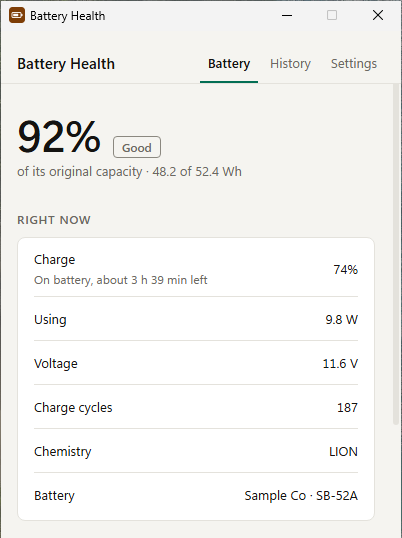
Full charge capacity compared with the design capacity, so you know how worn the battery is.
Right now
Charge, time left, power draw, voltage, charge cycles and chemistry, updated every few seconds while the window is open.
Wear over time
One reading a day builds your own history. It can also read Windows' battery report, which often goes back to when the PC was set up.
80% notice, if you like
An optional notification when charging reaches 80%, for people who like to unplug there. Off by default.
Information only
Battery Health reads information and never changes a power or battery setting.
Privacy in short
- On your PC
- One capacity reading per day and your settings. Stored in your Windows user profile and never uploaded by Battery Health.
- Bandwidth sharing
- EarnFM processes your IP address, a device ID and your consent record to run the sharing, based on your consent.
- Usage statistics
- Battery Health sends usage statistics to PostHog (EU): a random install ID, app and Windows version, sharing and settings status, feature use counts, crash summaries and, once you've agreed, recordings of how its window is used with your content hidden. Never your clipboard, snippets, what you type or window titles. No account, no ads.
- This website
- PostHog analytics and page recordings without cookies, to see which pages and campaigns lead to downloads and how the pages are used. It's served by Cloudflare, which handles your IP address to deliver the pages.
Questions
What do I need to run it?
Windows 10 or Windows 11, 64-bit. It installs for your Windows account only, so you don't need administrator rights. Battery Health uses Microsoft Edge WebView2, which is part of Windows 11 and most Windows 10 PCs; if it's missing, the installer fetches it.
Windows says it protected my PC. Is the download safe?
New downloads build trust with Microsoft's SmartScreen over time, so Windows may show "Windows protected your PC" for a while. The installer is signed by TeraShift GmbH. Check that the publisher shown is TeraShift GmbH, then choose More info and Run anyway.
Is it really free?
Yes. Every feature is included, with no ads, trials or purchases. Battery Health is paid for by sharing a little unused bandwidth, which you agree to when you first open it. How that works.
Can I use it without sharing bandwidth?
No. Sharing is what keeps Battery Health free, so the app asks first and only runs if you agree. If you choose "No thanks, quit", nothing is shared and the app closes.
Will it slow down my internet?
It's built to use only bandwidth you aren't using, and it stops while Battery Health isn't running. If you notice a difference you're unhappy with, uninstalling stops it completely.
How do I stop sharing or uninstall?
Uninstall Battery Health: open Windows Settings, then Apps, then Installed apps, find Battery Health and choose Uninstall. Sharing stops as soon as it's uninstalled. In the app, Settings, then Stop sharing, takes you to the same place. Step-by-step instructions.
What data does it collect?
The app's own data (one capacity reading per day and your settings) stays on your PC. For bandwidth sharing, EarnFM processes your IP address, a device ID and a record of your consent. Battery Health also sends usage statistics to PostHog, our analytics service in the EU: a random install ID, the app and Windows version, whether sharing and Start with Windows are on, which settings are switched on and how often features are used. Once you've agreed, it also records how its window is used, with your own content (clipboard items, snippets, app names, places) and input fields hidden. It never sends what you copy, type or store, or window titles. Details are in the privacy policy.
Does it start with Windows?
Yes, quietly in the tray, so it's there when you need it. You can turn that off in Battery Health's Settings. Anything that would interrupt you, like notifications or shortcuts, is off until you turn it on.
Does it work on a desktop PC?
It installs and runs, but a PC without a battery has nothing to show. It's made for laptops and tablets.
Get Battery Health
Free for Windows 10 and 11. By installing and agreeing in the app, you accept the terms of use.